Posts

Embedding HTML and JavaScript in new Google Sites

One of the exciting features recently released in the new Google Sites is the ability to embed HTML and JavaScript. It not only adds an additional feature, but is especially handy for those who like to tinker with the code. In the short time that I've gotten to work with it, I've already been able to embed our Semester Grade Calculator  (something I was never able to get to complete functionality with classic Google Sites) on our high school site. I've also started reworking the staff directories on our websites with this new ability ( https://mjhs.massac.org/staff-directory ). There really are a myriad of possibilities with this. While a working knowledge of HTML and JavaScript is certainly helpful, just remember...Google is your friend :) An additional resource for learning HTML/JavaScript (and more) is one of my go-to sites for web building assistance:  https://www.w3schools.com/ . Additional information can be found on the official G Suite Updates Blog at:  http...
Massac Unit #1 Blog: Forging Ahead in an Online Learning Environment

Check out the latest post from the Massac Unit #1 blog . It's the October Spotlight titled "Forging Ahead in an Online Learning Environment."

Text Rotation in Google Sheets

Image
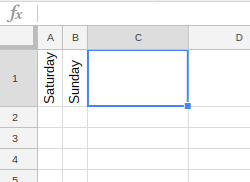
Google Sheets continues to receive new functionality. Recently, text rotation was added for our accounts. Text can be tilted, rotated, or stacked. It can also be set at a custom angle. Here's an example of what it looks like: To try out this feature, type some text in a cell, then click the Text Rotation button in the Sheets toolbar. Alternatively, you can also select Format, then Text Rotation in the drop down menu. Enjoy!

File Upload in Google Forms

Google Forms continues to grow and add features. One of the longest awaited features is en route. "Also debuting today is a top-requested feature from our business and education customers — the new “File upload” question type. Your respondents can now upload files from their computer or Drive — all of which are neatly collected for you in a new Drive folder.  Note: This feature is only available for G Suite customers in Forms shared within their organization." -  https://www.blog.google/products/g-suite/five-new-ways-reach-your-goals-faster-g-suite/ Personally, I have waited for this one a long time. I'm excited to test it out with our Trouble Ticket when we get access to it. This way if you have a tech issue/question, you can submit a picture or file that may help provide better detail.

Inbox by Gmail

Image
Our Massac accounts now have access to Inbox by Gmail. Think of it as a different approach to email. Our traditional Gmail is not going anywhere, this is just another way of looking at it. An interesting feature is the ability to check out pictures or shipping status without opening the message. There is a built-in reminder function. You can also snooze messages to a certain point in time, which essentially puts them away until you are ready for it. There is an Inbox app available on the Google Play Store  and on the Apple App Store . You can also visit inbox.google.com to check out Inbox by Gmail.

Vacation Responder in Gmail

Image
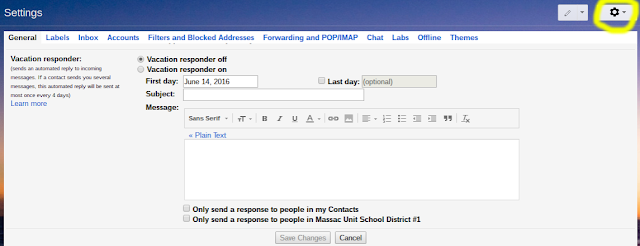
Heading out of town? While it isn't a new feature, it is worth mentioning for the summer. Gmail has a vacation response section included in the Settings. While in your email, click the Settings gear. Scroll all the way to the bottom and you will see the Vacation responder section. There are a few settings to play with. Timing, who to send the message to, and the message itself. In any event, if you are going to be somewhere where access is limited or you are just unavailable for a day or a week, the vacation responder may come in handy.

Android Apps coming to Chrome OS

Image
As has previously been speculated, the official Google Chrome Blog had a post yesterday  detailing the arrival of Android Apps to Chrome OS (Chromebooks and the like). The first devices will see the arrival of the Google Play Store in mid-June, while others will follow suit later in 2016. Based on looking at the list of supported devices they currently have, it appears that a portion of our current Chrome devices will indeed support Android Apps. I would imagine that most new Chromebooks from here on out will also have support for this. This is definitely exciting news and it opens up a segment of applications not previously available to use.