Posts

Government urges to stop using Internet Explorer

Image
With the recent news that the Federal Government is urging users to switch browsers and stop using Internet Explorer (the blue "e"), now is the perfect time for you to start using Google Chrome. Using Google Chrome has several benefits including: Security - Chrome has built-in malware protection and it updates automatically Speed - It is the fastest browser in regards to startup and downloading Signing In - Your bookmarks, history and all other settings are accessible across any device. (This allows you to use your smart phone to access your current tabs that are open on your work computer.) Extensions - There are several very useful Chrome extensions available in the Chrome Webstore. Here are a few links with some more detailed information: Why use Google Chrome? Governments urge Internet Explorer users to switch browsers
Direct Links and Short Links

For quite some time now, we've had fairly simple direct links to our websites. The following is a list for reference. Massac Unit School District #1 - massac.org or unit1.massac.org Massac County High School - mchs.massac.org Massac Junior High School - mjhs.massac.org Metropolis Elementary School - mes.massac.org Brookport Elementary School - brookport.massac.org Jefferson Elementary School - jefferson.massac.org Franklin Elementary School - franklin.massac.org Unity Elementary School - unity.massac.org Metropolis Primary School - primary.massac.org Massac Technology - tech.massac.org Massac Food Service - foodservice.massac.org Massac Forms - forms.massac.org There are some others as well, but I thought it would be helpful to list these here. We also have the ability to create short links for websites using our domain name. An example of this is with InformationNOW. The actual website for our InformationNOW is:  https://516471.stiinformationnow.com/InformationNo...

Images in Google Forms

Image
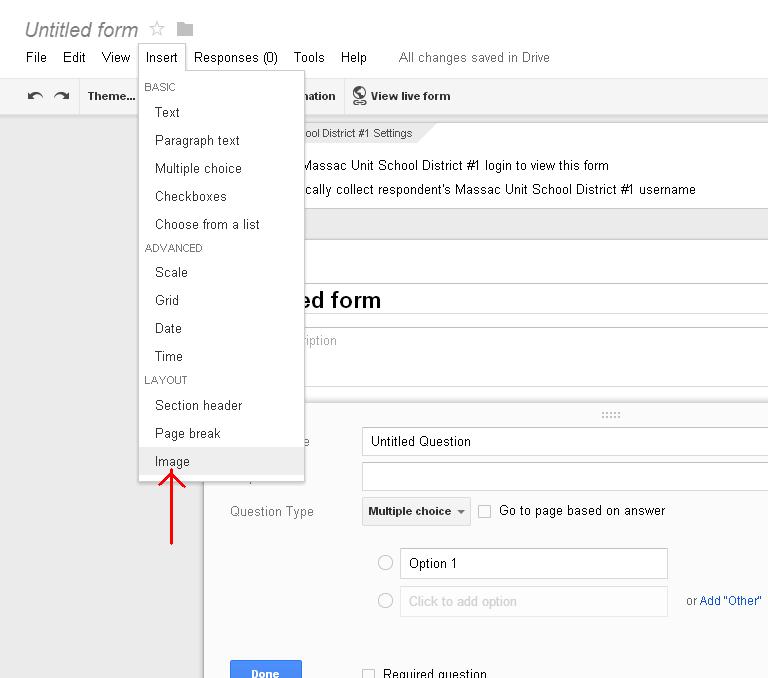
Although it was already available with a little hardwork and scripting, now it is very easy to add an image to a Google Form. Once you are in the creation window of a Google Form, click Insert. At the very bottom of the dropdown you will see Image. (see picture below) Click Image to bring up the window that allows you to insert your desired picture, clipart, etc... This could be very handy in creating different assignments, assessments, or just unique surveys.

Google Search Calculator / Desmos Graphing Calculator

Image
One of the fun little tricks that Google Search can be used for is math. If you type a math problem into Google (i.e. 2+2), the following result is this screen: The Google Search calculator can be quite handy if you are in a pinch to do some number crunching. For a little more robust tool that has graphing capabilities, try Desmos Graphing Calculator . Desmos allows you to save, share, and print your graphs, as well as link to your Google Account. Best of all, both of these methods are free!

WeVideo

Image
     One of the great online video creation tools I have come across is WeVideo ( http://www.wevideo.com/ ). WeVideo strives to make sure video creation is available for everyone. The interface ranges from being suitable for a novice to experienced editors. There are a variety of editing modes including storyboard, timeline, and advanced. There are also many themes to choose from. WeVideo is browser based, but also works on some mobile devices. This is free, but there are paid options available as well. WeVideo is certainly worth checking out if you are interested in any aspect of video creation.

Screencast-O-Matic

Image
One of the easiest tech tools I have found to use is Screencast-O-Matic ( http://www.screencast-o-matic.com/ ). The free application allows you to perform  screen capture (also audio and webcam) recording on Windows or Mac computers with no installation needed. Screencast-O-Matic is centered around being user-friendly. The free account allows you to record up to 15 minutes, publish to YouTube HD, and also publish to various file formats. It is a wonderful component for those of you that want to record lessons for your students to watch at home, on their mobile device, or in school. The paid account ($15/yr) offers quite a bit more features, but the free account is certainly very useful.

Google Search (Reading Level)

Image
One of the interesting features about Google Search is that you can refine results by reading level. Google breaks items up into three areas (Basic, Intermediate, and Advanced). If you or your students are searching for information, this may be handy in finding level appropriate content. The following is from Google's help page about reading level: How to modify your search results by reading level Click  Search tools  at the top of the search results page. Click  All Results . Click  Reading level . You'll now see results annotated with reading levels as well as a percentage breakdown of results by reading level. To filter your results by a specific reading level, select your desired level ( Basic , Intermediate , or  Advanced ). At any time, you can click  View results for all reading levels  to go back to seeing all results. Here is a picture illustrating this feature: To learn more about this feature, check out Google's help arti...