Posts

Google Plus (for Massac) / Other Items

As of today, we now have access to Google Plus with our Massac accounts. If you are unfamiliar with Google Plus, it is essentially Google's version of Facebook. In the upper left corner of your e-mail inbox, you will see a +You link. If you click this, it will direct you to the pages that need to be filled out in order to use the feature. Likewise, you can also visit http://plus.google.com and sign in with your Massac account. Google Plus has been around for a little while, but it is completely new for our Google accounts. Think of it as an additional way to network with your peers and professional colleagues. It is a great way to share ideas,  links, pictures, videos, etc. This is entirely optional, but I wanted to let you know that it was available. Also, we are on our fourth school year of Google Apps. We are using these Apps more and more. Almost every staff member uses Google Drive (Docs, Spreadsheets) in some form or fashion. Since we installed our web tracking back in O...

Remote Support (join.me)

Image
Hello Massac Staff! For the 2012-2013 school year, we are going to experiment a bit more remote support. We have done a little of this in the past through various methods, but have found this to currently be one of the best options available. If you visit http://tech.massac.org , you will see a Remote Support button in the links at the top (see picture below). If you click this button, you will be downloading the join.me client software (Windows version). After you run the quick installation, you will be given a 9 digit code that you can share with us so that we may remotely access your computer. Provided  you can reach us on the phone or through Google Voice Chat on the computer (microphone and speakers required), then we can hopefully talk through the issues while we are accessing your computer.  You will need to have internet access for this to work.  This will not be useful for every problem, but could certainly provide us a way to tackle the smaller issues ...

Google Drive

Image
Some of you may have already noticed that Google Drive is replacing Google Docs. It can be accessed via your web browser, the Google Drive client on your PC, or the Google Drive mobile app. With 5GB of storage, this is a very nice feature within your Google account. It will be rolling out to all users over the next 4-8 weeks. Everything you did with Google Docs is still the same, however, there are many added new features including What’s completely new  - Sync files between all of your devices with Google Drive for your Mac/PC - Download the  Drive mobile app for your iPhone or iPad - View and search Google Drive on the web in a visual way with  grid view - Add a file to a folder by clicking the folder icon within a file or Google document, spreadsheet, or presentation - Work with more file types by installing  Google Drive apps  from the Chrome Web Store What's changed  - Collections are now called folders - More things have be...

Educreations

Image
The other day I ran across a wonderful free app/service on the iPad that is certainly worth sharing. Educreations ( http://www.educreations.com/ ) allows you to create and share video lessons on the iPad or from your web browser. It is basically your own record-able whiteboard. After you record your lesson, you can upload it to their site and choose to share it with your students, your school, or the general public. There is currently no directory to search for public lessons, but you can provide your students with a course link or code so that they can access everything you upload to your class. While the functions are very basic with this app/service, it keeps it easy to use and share.

Substitute Call System Mobile Application

Image
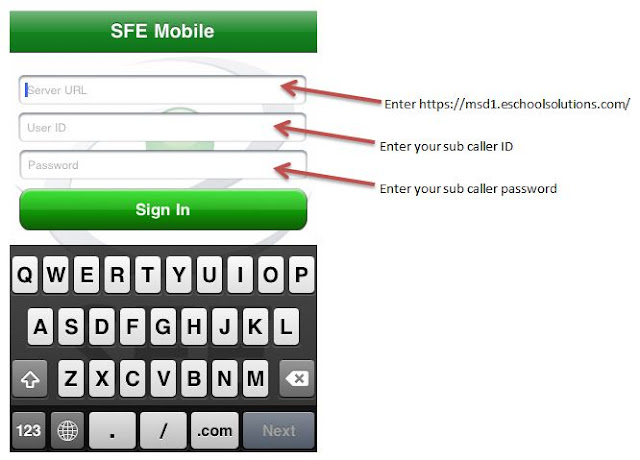
If you are an iPhone/iPod Touch user, you can download the free SmartFindExpress application from the App Store to use the substitute call system. Please note that the mobile app has limited features. You can learn more about the app by visiting,  http://itunes.apple.com/us/app/sfemobile1/id388482560?mt=8 . If you decide to download and try it out, make sure you follow the directions in the image below to access your account. Feel free to comment on this post about your experience with the mobile app.

A new look!

The Massac Tech Ed blog has been given a face lift.  You will now see clickable links (Classic, Flipcard, etc.) at the top of the blog that allows you to view the blog however you would like.  It is what Blogger is calling, "a dynamic interface." If you blog or were thinking about starting one for your class, this certainly makes it a bit more exciting. I have turned on the feature for this blog to be viewed easier on a mobile device (iPhone, Android, etc.).  The district website ( http://massac.org ) and the high school website ( http://mchs.massac.org ) will also automatically adjust to your mobile device. Enjoy!

Make sure you wish...

Image
...a Happy 30th to Aaron Clark tomorrow!