Posts

Educreations

Image
The other day I ran across a wonderful free app/service on the iPad that is certainly worth sharing. Educreations ( http://www.educreations.com/ ) allows you to create and share video lessons on the iPad or from your web browser. It is basically your own record-able whiteboard. After you record your lesson, you can upload it to their site and choose to share it with your students, your school, or the general public. There is currently no directory to search for public lessons, but you can provide your students with a course link or code so that they can access everything you upload to your class. While the functions are very basic with this app/service, it keeps it easy to use and share.
Substitute Call System Mobile Application

Image
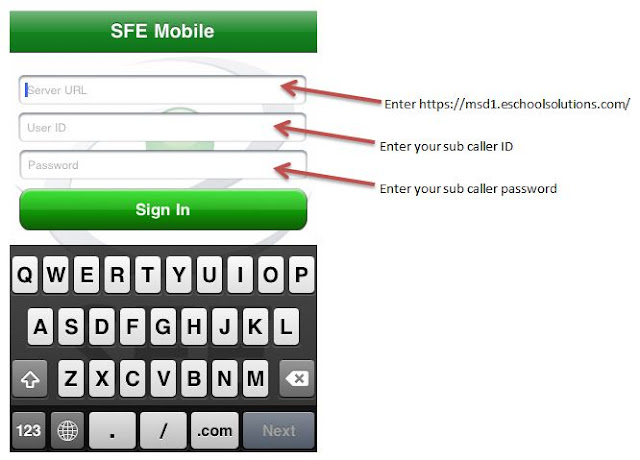
If you are an iPhone/iPod Touch user, you can download the free SmartFindExpress application from the App Store to use the substitute call system. Please note that the mobile app has limited features. You can learn more about the app by visiting,  http://itunes.apple.com/us/app/sfemobile1/id388482560?mt=8 . If you decide to download and try it out, make sure you follow the directions in the image below to access your account. Feel free to comment on this post about your experience with the mobile app.

A new look!

The Massac Tech Ed blog has been given a face lift.  You will now see clickable links (Classic, Flipcard, etc.) at the top of the blog that allows you to view the blog however you would like.  It is what Blogger is calling, "a dynamic interface." If you blog or were thinking about starting one for your class, this certainly makes it a bit more exciting. I have turned on the feature for this blog to be viewed easier on a mobile device (iPhone, Android, etc.).  The district website ( http://massac.org ) and the high school website ( http://mchs.massac.org ) will also automatically adjust to your mobile device. Enjoy!

Make sure you wish...

Image
...a Happy 30th to Aaron Clark tomorrow!

Welcome Back!

I hope everyone had a nice summer. As we are now getting back into the swing of things, please remember to submit your tech issues to our trouble ticket system at http://sl.massac.org/ticket . If you are a new staff member or need a refresher about the Substitute Call system, please email Aaron Clark at aclark@massac.org . Also remember to visit our technology website at http://tech.massac.org for helpful resources, documents, and other useful information. Have a great year!

Preview ZIP and RAR Files from Massac Mail

Opening a ZIP or RAR (compressed/archived file types) can be a bit worrisome especially if you are unsure of the sender. Every once in a while, people try to send viruses through these file types. However, you can now preview ZIP and RAR files directly through Massac Mail (GMail) via Google Docs. You will also be able to download selected items within the files themselves. This can be quite a time saver, especially if you only need a couple of files from the main ZIP or RAR. This feature also works on Google Docs Mobile as well.

Massac Docs Updates - June 2011

This is an interesting read if you use Google Docs and/or our Massac Docs (from Google). http://googledocs.blogspot.com/2011/06/few-improvements-to-discussions-in.html To access your Massac Docs, visit http://docs.massac.org .