Posts

Drag and Drop Attachments in E-Mail

This applies only to Mozilla Firefox and Google Chrome users for the time being. This will work for our Massac E-Mail and GMail. Click the link below. http://gmailblog.blogspot.com/2010/04/drag-and-drop-attachments-onto-messages.html?utm_source=feedburner&utm_medium=feed&utm_campaign=Feed:+OfficialGmailBlog+(Gmail+Blog)

New District Website

Please visit our new school district website at http://massac.org Our new method will allow us to work more collaboratively on the district site. If you would like to visit the old site, click the Legacy Site link at the bottom of the links section on the new site. The old site will remain up for the remainder of the school year, then it will be permanently taken down.

Aviary for Massac Apps

Some more free tools to play with... Using our Massac Apps (Mail, Docs, etc) logins we now have access to Aviary. What is Aviary? "Aviary is a suite of FREE web-based design tools. Aviary offers the power and capabilities of leading desktop editors and design tools, with the freedom and flexibility of browser-based applications. Whether you are trying to edit a screen capture of your website, remix a music track, or create a logo, Aviary has the right tool for you." After playing around with this for a couple of days, it truly is a great free web-based tool...no installation needed. There are plenty of options to play around with. You can access Aviary by clicking this link http://sl.massac.org/aviary or from your Mail Inbox page: Click the more link at the top of the page (left side), Click Aviary in the drop down menu Have fun playing around!

Stellarium for studying the stars.

Image
I found this great open source program that is available for pretty much any operating system though a new computer would run it well.  http://www.stellarium.org/ You can even use a average projector and project this to study constellations, and planets. 

Thumbnail View Google Docs

Image
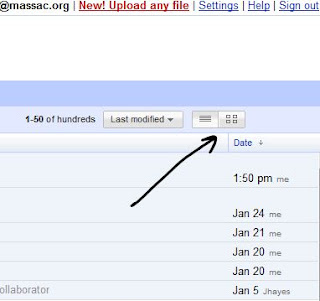
This is a small change, but a nice one. Google has added a thumbnail view for Google Docs. Our Docs site can be accessed at http://docs.massac.org To change from list view to thumbnail view, click the button as shown belown You will see a thumbnail display of your files like this Just wanted to share the update for our Docs.

Online File Storage with Google Apps

Now this truly is handy. With your Massac E-Mail (Google Apps) Account, you can now upload, store, and share any file in Google Docs. I attempted this with a song (.mp3) and a picture (.jpg) and it worked. The real power of this lies in the fact that if you are working on a Word Document (2003/2007), Excel Spreadsheet (2003/2007), or PowerPoint (2003) you can save it to your online storage space without having to convert it. This way your files are stored in their original format and are downloadable from anywhere. (I tried downloading from my phone...and that worked too!) 1. To access this visit http://docs.massac.org and login with your E-Mail credentials. 2. In the left hand column, click the button that shows 'Upload' 3. If you are choosing to upload a document and you would like to preserve original formatting, uncheck the box that says Convert documents, spreadsheets, & presentations... 4. Click the Start Upload button. File upload make take a little time. 5. If ...

Using Word 2007 to Update Blogs

Do you have Office 2007? If so you have seen the dramatic differences in the user interface. Amongst the changes is the addition of the ability to publish to a web blog. The way that you set this up is to click on the office button and select publish. Then you can select blog. All you have to do then is select your blog provider. Then Word will prompt you to enter in your account username and password. After that you can start publishing directly to your blog from Word 2007!